The mentioned functionalities may be restricted depending on the purchased software license.
Public display Template Management
Public display templates are the foundation of your custom visualizations. They define the layout, structure, and visual elements that will be applied to your installations. This comprehensive guide covers everything from basic template creation to advanced design techniques.
📋 Overview
What are Public display Templates?
Templates serve as reusable blueprints that:
- 📐 Define visual layouts for your public displays
- 🧩 Organize content blocks and their positioning
- 🎨 Establish design consistency across multiple installations
- ⚙️ Enable rapid deployment of standardized visualizations
- 🔄 Support easy updates across all linked configurations
Key Benefits
| Benefit | Description |
|---|---|
| 🚀 Efficiency | Create once, use across multiple installations |
| 🎯 Consistency | Maintain uniform design standards |
| 🔧 Flexibility | Easy modification without recreating from scratch |
🚀 Getting Started
Template Workflow
- 📐 Design Layout - Plan your visual structure
- 🎨 Create Template - Build using the template editor
- 💾 Save Template - Store for reuse across installations
Prerequisites
Before creating templates, ensure you have:
- ✅ SmartgridX account with appropriate permissions
- ✅ Clear design objectives for your visualization
- ✅ Content requirements (images, data points, layouts)
🎛️ Template Management Interface
Accessing the Template Manager
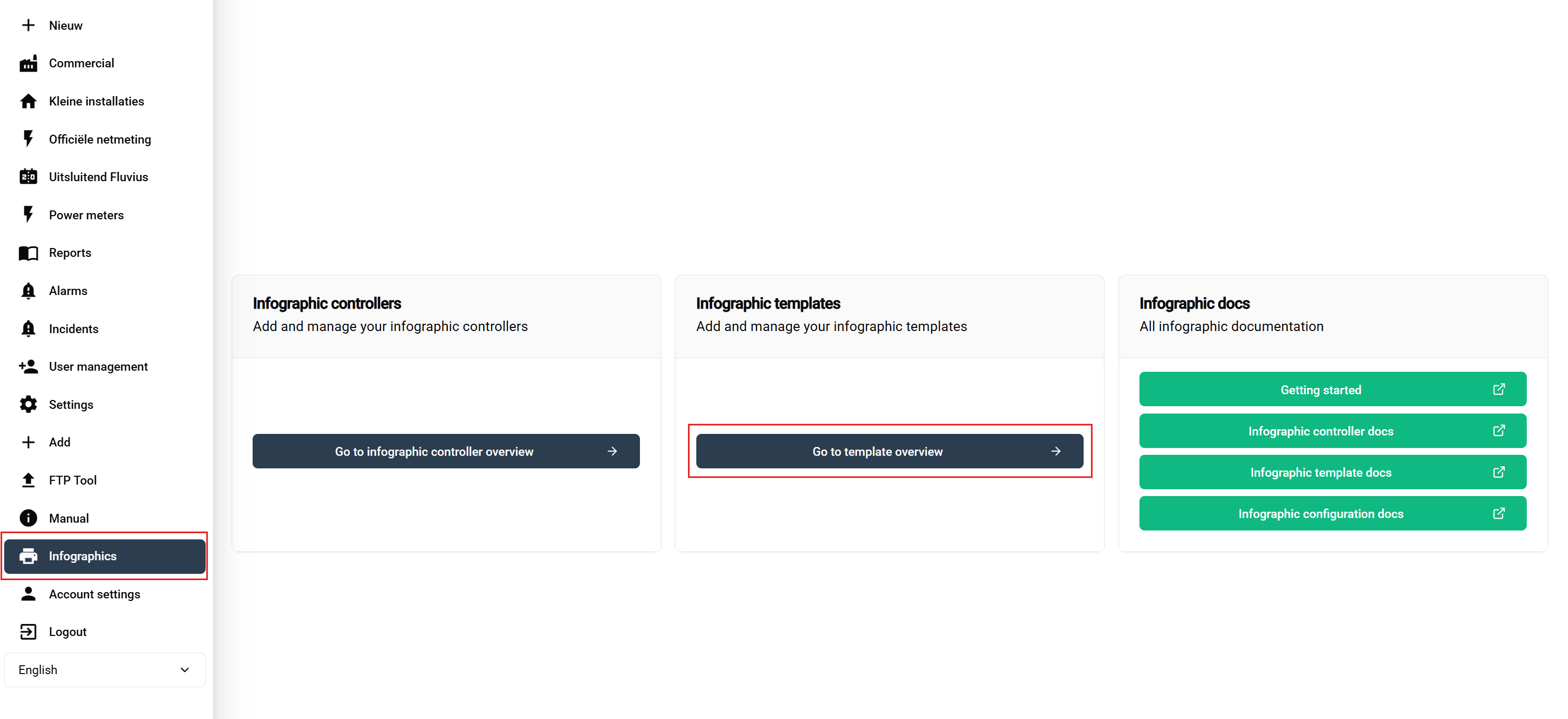
Navigation steps:
- Login to your SmartgridX account
- Navigate to 'Public displays' in the main sidebar
- Click 'Public display Template' button on the overview page
This opens the template management interface where you can view, create, edit, and delete templates.
Template Overview Table

Available actions:
- ➕ Add - Green button to start template creation
- ✏️ Edit - Modify existing template design
- 🗑️ Delete - Remove unused template
🎨 Template Creation Process
Starting a New Template
Click the "Create New Template" button to open the template editor interface.
Template Header Configuration
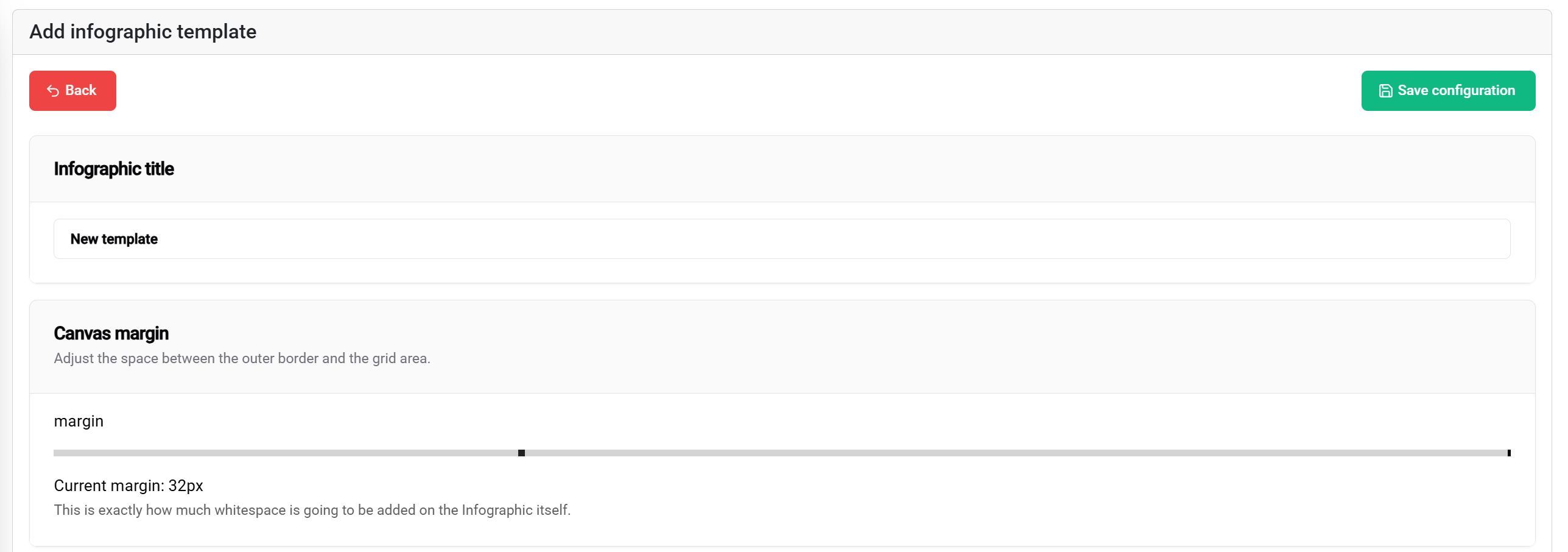
Title Settings
Template Title:
- Purpose: Identifies the template in lists and configurations
- Best practices: Use descriptive, project-specific names
- Examples: "Factory-KPI-Dashboard", "Energy-Monitoring-Layout", "Multi-Zone-Display"
Margin Configuration
Margin settings define the safe area from the display borders:
Margin Slider (0-100px):
- 📐 Range: 0 to 100 pixels from display edge
- 🎯 Purpose: Creates safe spacing to prevent content cutoff
- 📱 Application: Ensures visibility on various display types
- ⚙️ Recommendation: Use 10-20px for standard displays, 30-50px for edge-to-edge screens
Visual impact:
- 0px margin - Content extends to display edges
- 50px margin - Content starts 50 pixels from all borders
- 100px margin - Maximum safe area with substantial border spacing
Save Functionality
The 💾 Save button (top-right corner) allows you to save your current template.
🧩 Block Layout System
Understanding the Grid System
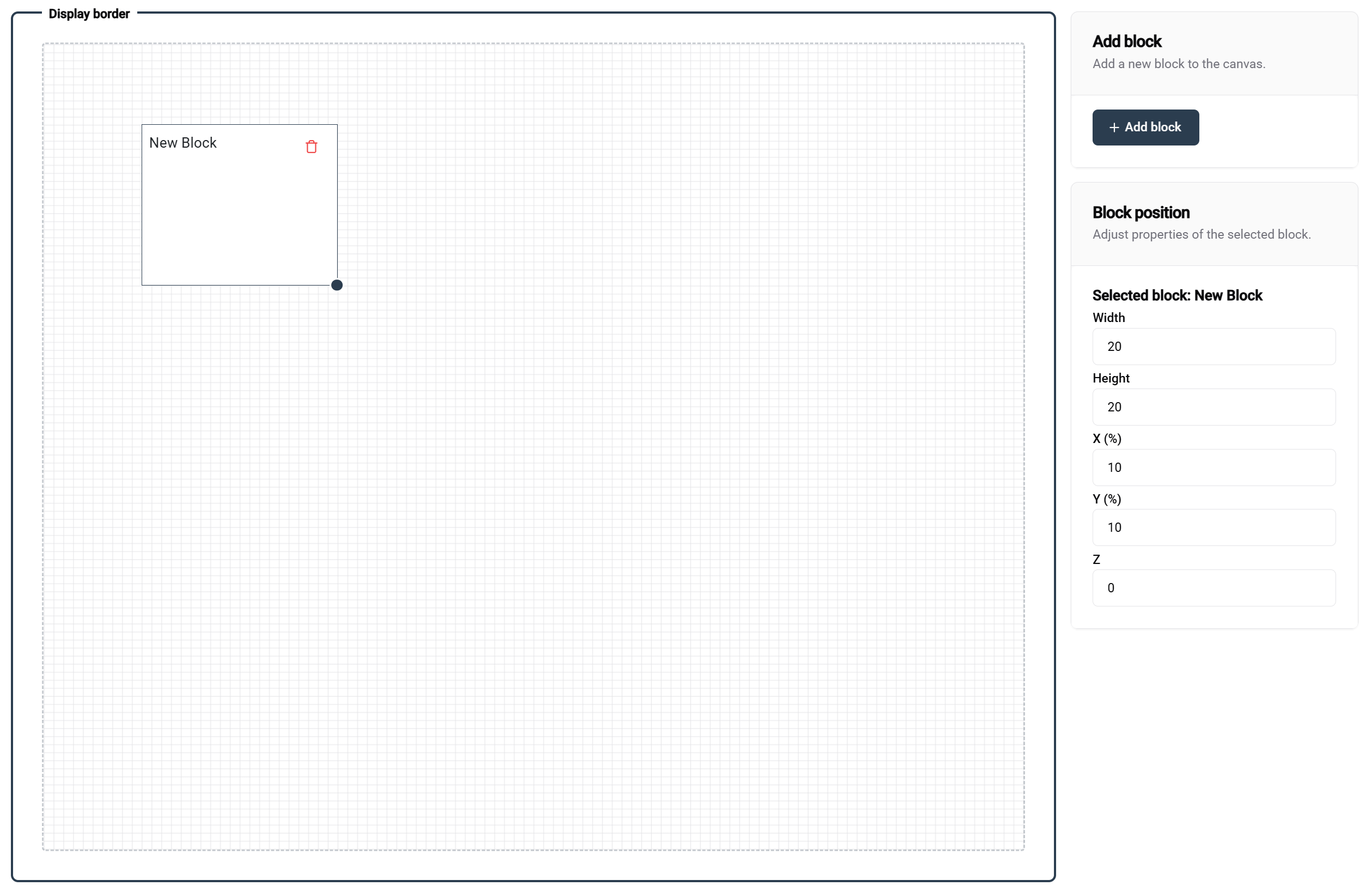
Grid Fundamentals
The template editor uses a 100×100 percentage-based grid system:
Grid Properties:
- 📐 Dimensions: 100 units width × 100 units height
- 📊 Units: Percentage values (1 unit = 1% of total dimension)
- 🎯 Precision: Allows exact positioning and sizing
- 📱 Responsive: Automatically adapts to different screen sizes
Block Layout Examples
- 🖼️ Single Block
- 📊 Side-by-Side
- 📚 Stacked Layout
- 🔲 Quad Layout
Configuration: 100 width × 100 height
Result: Full-screen coverage
Use case: Single large visualization, full-screen image
┌─────────────────────────────────┐
│                                 │
│         FULL BLOCK              │
│                                 │
│                                 │
└─────────────────────────────────┘
Configuration: Two blocks at 50 width × 100 height
Result: Split-screen layout
Use case: Comparison views, dual data displays
┌─────────────────┬───────────────┐
│                 │               │
│    BLOCK 1      │   BLOCK 2     │
│                 │               │
│                 │               │
└─────────────────┴───────────────┘
Configuration: Two blocks at 100 width × 50 height
Result: Vertical stack
Use case: Header/content, title/details layouts
┌─────────────────────────────────┐
│            BLOCK 1              │
│                                 │
├─────────────────────────────────┤
│            BLOCK 2              │
│                                 │
└─────────────────────────────────┘
Configuration: Four blocks at 50 width × 50 height
Result: Quadrant layout
Use case: Multi-metric dashboards, comparison grids
┌─────────────────┬───────────────┐
│    BLOCK 1      │   BLOCK 2     │
│                 │               │
├─────────────────┼───────────────┤
│    BLOCK 3      │   BLOCK 4     │
│                 │               │
└─────────────────┴───────────────┘
Block Manipulation
Adding Blocks
Method: Click the "Add Block" button (top-right of editor)
Result: New block appears with default dimensions
Next steps: Position and resize as needed
Positioning Blocks
Drag and Drop:
- 🖱️ Click and hold any block to move it
- 📍 Real-time preview shows position while dragging
- 🧲 Grid snapping helps with precise alignment
- 👁️ Visual guides appear to assist with alignment
Resizing Blocks
Resize Handle:
- 📐 Bottom-right corner shows resize handle when block is selected
- 🔧 Drag to resize both width and height simultaneously
- 📊 Real-time values display current dimensions
Precision Controls
Right-Side Position Panel
When a block is selected, the right panel provides:
Position Controls:
- 📍 X Position - Horizontal offset from left edge (0-100)
- 📍 Y Position - Vertical offset from top edge (0-100)
- 🎨 Z-Index - Layer ordering for overlapping blocks
- 📏 Width - Block width percentage (1-100)
- 📏 Height - Block height percentage (1-100)
⚙️ Block Configuration
Block Types and Properties
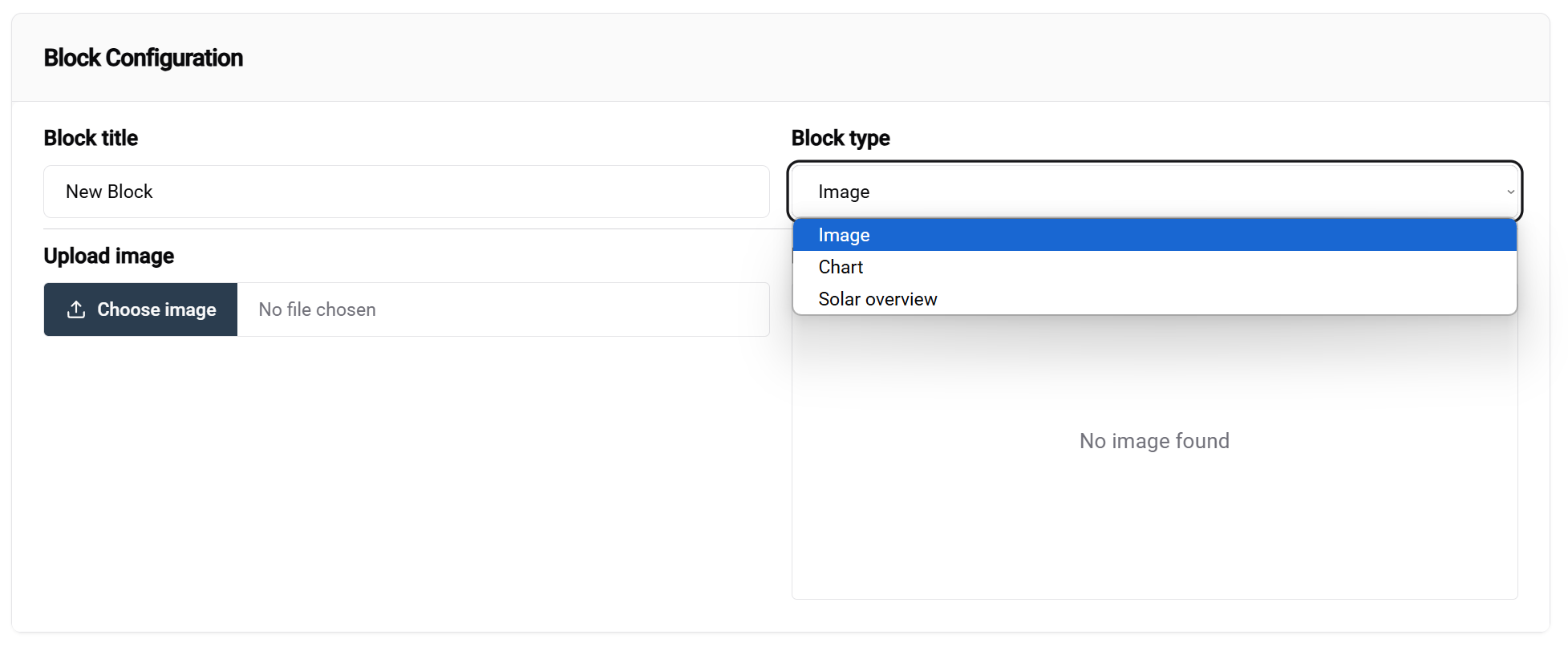
Accessing Block Configuration
Method:
- Select a block in the editor canvas
- Configuration panel appears at the bottom of the screen
- Block type dropdown is the primary configuration option
Note: Not all blocks are currently configurable. This will change as development continues. More block types will be added in future updates.
Available Block Types
- 🖼️ Image Block
- ☀️ Solar overview
- 📈 Chart Block
Purpose: Display static images, logos, backgrounds, GIFs Configuration options:
- 📁 Image source - Upload or URL that will be used as default for this block. You can leave this empty if you want to force an image to be selected in the configuration
Use cases:
- Company logos and branding
- Background images
- Equipment photos
- GIFs
Purpose: Display realtime values
Use cases:
- Quick overview of your solar data
Purpose: Visualize data trends and comparisons
Configuration options:
- 📊 Chart type - Line, bar
Use cases:
- Visualize real-time production and energy data
Template Examples
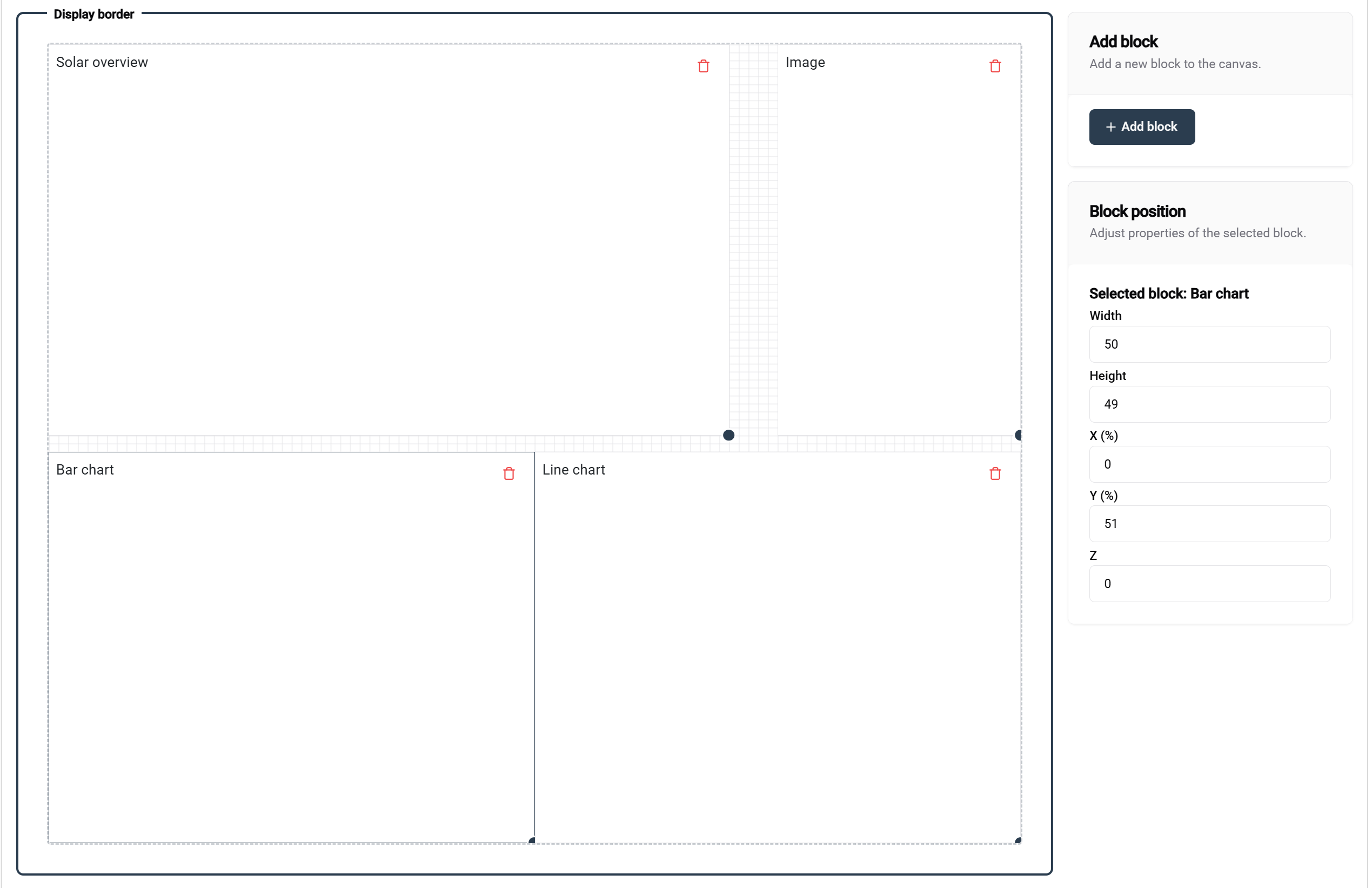
This example demonstrates a well-structured template with:
- 📊 Clear block organization with descriptive labels
- 📐 Proper spacing and alignment
- 🎯 Functional block types for different content needs
Block naming in this example:
- Each block shows its intended purpose
- Clear labeling helps with configuration
- Logical organization supports maintenance
📚 Related Documentation
Next Steps
After creating your template:
- ⚙️ Configure Installations - Apply templates to specific installations
- 🎛️ Link Controllers - Connect to display hardware
- 🚀 Getting Started Guide - Complete workflow overview
Advanced Topics
- 🎨 Advanced Design Techniques
- 📊 Custom Data Integration
- 🔄 Automated Template Updates
- 👥 Multi-user Template Collaboration
💡 Best Practices Summary
Template Design
✅ Design principles:
- 🎯 Keep it simple - Focus on essential information
- 📱 Design responsively - Test on different screen sizes
- 🎨 Maintain consistency - Use standardized colors and layouts
Template Management
✅ Organization tips:
- 📝 Use descriptive names - Make templates easy to find
- 🔄 Regular maintenance - Remove unused templates
- 👥 Share standards - Ensure team consistency
🎨 Ready to Design? With your template created and configured, you're ready to deploy stunning visualizations across your SmartgridX installations!